In this guide, we will explore which anti-detect browser for iPhone and iPad is best suited for affiliate marketing, how they differ from their desktop counterparts, and how to select the optimal anti-detect solution with proxy support for iOS.
Table of Contents
- Why you need anti-detect browsers for iPhone
- Differences between iOS and desktop anti-detect browsers
- Top 10 best anti-detect browsers for iPhone
- How to choose an anti-detect browser with proxy for iPhone
- Do anti-detect browsers exist for iPad?
Anti-detect browsers are essential tools for anyone earning income through affiliate marketing. iOS devices come with built-in privacy measures and strict limitations, making anonymous operations more challenging. Standard browsers on iOS track user activity, log IP addresses, collect device fingerprints, and transmit data to servers or websites. This makes it difficult to bypass restrictions or manage multiple accounts safely.
To hide these digital footprints, affiliate marketers rely on anti-detect browsers. These tools spoof device fingerprints, support proxy integration, and block trackers and cookies. Such browsers allow you to visit websites without the risk of leaking data or getting banned on advertising platforms.
In this article, we will explore which anti-detect browser for iPhone and iPad is best suited for affiliate marketing, how they differ from desktop versions, and how to select the optimal anti-detect solution with proxy support for iOS.
★ 6.6 Linken Sphere 2 One of the first solutions in the CIS market designed for multi-accounting tasks. Sphere browser is the pioneer of what we now call anti-detect technology.
★ 6.6 Undetectable Designed to create numerous unique digital fingerprints. It masks your real IP address, device data, operating system, and other characteristics that websites use for identification.
★ 9.9 Vision A service highly favored by affiliate marketers, bonus hunters, and more. This is no surprise: the browser generates authentic fingerprints in just two clicks, and the support team never leaves users to face problems alone.
★ 7.2 0detect This service offers an advanced set of features for managing multiple accounts while maintaining anonymity. Its key feature is digital fingerprint substitution, allowing you to modify the User-Agent, device settings, and more.
Why you need anti-detect browsers for iPhone
Browsing the web via the default browser on an iPhone or iPad does not guarantee complete anonymity. Websites, advertising platforms, and fraud prevention algorithms constantly monitor user activity, analyze IP addresses, check device fingerprints, and track cookies. Strict measures are especially prevalent in traffic arbitrage: advertising dashboards for Google, Facebook, and TikTok actively combat bypass methods, detect multi-accounting, and restrict access.
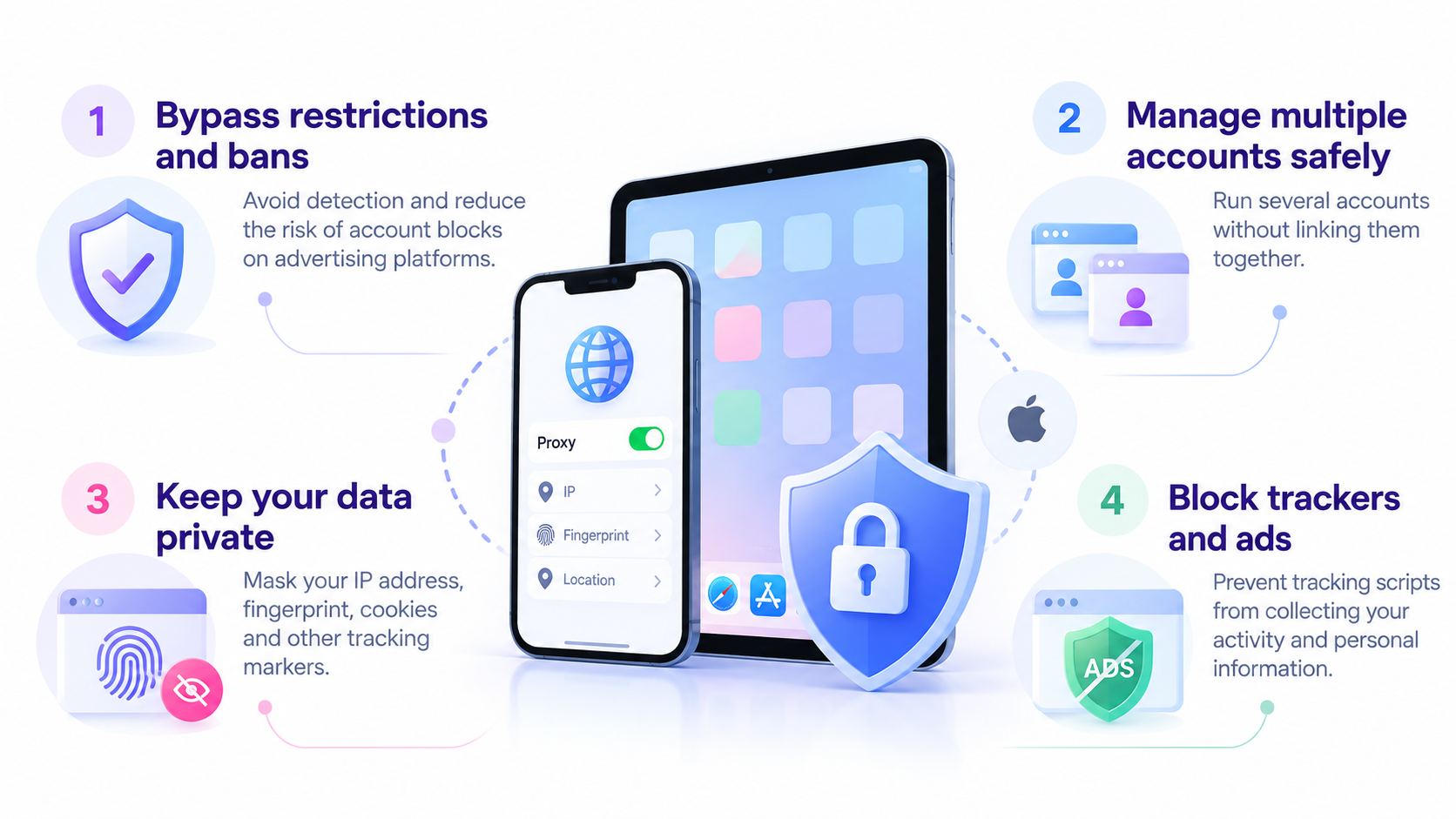
Anti-detect browsers, including those designed for iOS, help resolve these issues. They alter your digital footprint, spoof geolocation, conceal actual device data, and enable website access via proxies. This provides several key advantages:
- Bypassing bans and restrictions: Anti-fraud systems find it much harder to identify duplicate registrations.
- Secure multi-profile management: You can run advertisements from multiple accounts without linking them together.
- User data anonymity: The browser masks your IP address, fingerprint, cookies, and other markers utilized by tracking systems.
- Protection against trackers: Most anti-detect solutions block advertising scripts designed to harvest visitor information.
For affiliate professionals operating via iPhone, such browsers become indispensable. They help safeguard accounts, minimize blocking risks, and enhance the overall effectiveness of advertising campaigns.
Differences between iOS and desktop anti-detect browsers
Anti-detect browsers on iPhone function differently than their PC counterparts. Apple strictly controls the iOS ecosystem, restricts access to system-level data, and prohibits third-party rendering engines. Unlike desktop browsers, where you can deeply customize fingerprints, modify request headers, and utilize advanced proxy configurations, iPhone and iPad offer fewer possibilities. Here are the primary distinctions between iOS and desktop browser versions:
- Limited functionality: iOS lacks full access to the file system and network layers, making fingerprint spoofing more complex. Desktop anti-detect browsers allow for much deeper customization.
- WebKit engine: All browsers on iPhone operate on WebKit—even Chrome and other alternatives. This complicates data spoofing, as the standard Safari engine is still being used underneath.
- Restricted proxy server operations: On a PC, you can configure a proxy for each profile individually, whereas iOS typically requires a global proxy setup through a dedicated application.
- System-level tracker protection: iPhones feature built-in privacy mechanisms from Apple, but these do not serve as a complete replacement for a dedicated anti-detect solution.
- App Store availability: Many desktop anti-detect browsers are released as full-featured applications, but on iOS, they must be heavily adapted to comply with Apple’s strict guidelines.
Despite these limitations, anti-detect browsers on iOS remain highly valuable. They assist in bypassing blocks, hiding IP addresses, protecting advertising accounts, and masking online activity. The key is selecting the right browser for traffic arbitrage.
Top 10 best anti-detect browsers for iPhone
We have compiled a list of the top anti-detect browsers chosen by webmasters for their daily operations.
Tor Browser Tor Browser is an anti-detect browser focused on enhanced anonymity, utilizing the Tor network to conceal traffic and protect user data.
- Pros: Complete anonymity, access to restricted websites, built-in tracking protection, and configurable bridges.
- Cons: Slower connection speeds, some websites may not function properly due to Tor network specifics, and occasional connection issues. Completely free, requires iOS 15.0 or later.
Ghostery Privacy Browser Ghostery Privacy Browser is an anti-detect browser specifically engineered for user privacy and security.
- Pros: Blocks trackers, accelerates page loading, and features a straightforward interface.
- Cons: Lacks advanced configuration options. Free to use, with premium features available for $4.99 per month. Requires iOS 15.0 or later.
Firefox Focus Browser Firefox Focus Browser is a mobile browser developed by Mozilla, designed to ensure maximum user privacy.
- Pros: Automatic tracker blocking, instant deletion of history and cookies upon exiting the app, and high browsing speed.
- Cons: No tab support, no extensions, and no proxy compatibility. Completely free, requires iOS 14.0 or later.
iCab Mobile Browser iCab Mobile is a robust mobile browser packed with advanced features, available for iOS devices.Pros: Extension support, content filtering capabilities, and highly flexible settings.
Cons: Paid application, and the interface can be complex for beginners. Costs $2.99 per month, requires iOS 11.0 or later.
Avast Secure Browser Avast Secure Browser is a protected browsing solution from Avast, a well-known antivirus software developer.
- Pros: Built-in phishing protection, ad blocking, and an integrated password manager.
- Cons: Limited iOS compatibility: certain features may be unavailable. Requires an Avast account. Free to use, with optional paid features. Requires iOS 14.0 or later.
RedApp Browser RedApp Browser is a free anti-detect browser for iOS featuring a simple, user-friendly interface.
- Pros: Tracking protection, malicious website blocking, and a customizable interface.
- Cons: Lacks many of the advanced features found in competing browsers. Completely free, requires iOS 12.0 or later.
DuckDuckGo Browser DuckDuckGo is an anti-detect browser created by the developers of the privacy-focused search engine of the same name.
- Pros: Excellent privacy, no activity tracking, intuitive interface, ad-free experience, and fast performance.
- Cons: Search results are less comprehensive than Google’s, no voice search, fewer images in results, no reverse image search, and some websites may block access. Completely free, requires iOS 15.0 or later.
Puma Browser Puma Browser is an innovative mobile browser focused on privacy and seamless integration with Web3 technologies.
- Pros: Does not track user activity or save history, features Web3 integration to expand decentralized app capabilities, supports microtransactions, and integrates with AI models.
- Cons: Due to its strict focus on privacy and Web3, some traditional browser features may be missing. File size is around 1GB. Completely free, requires iOS 17.0 or later.
Snowbunny Private Web Browser Snowbunny Private Web Browser is a fast and lightweight browsing solution for iOS devices.
- Pros: High operational speed, full-screen mode, rapid image loading, and a dedicated incognito mode.
- Cons: No tab support, no extension compatibility, and no password saving functionality. Completely free, requires iOS 12.0 or later.
Incognito Browser Incognito Browser is a private browsing tool designed to ensure user privacy. This browser can be launched from any application: simply highlight a link or text, tap “Share,” and select Incognito.
Cons: Lacks extension support and some advanced features, the interface is overly simplistic, and it may be inconvenient for users accustomed to feature-rich browsers. Completely free, requires iOS 14.7 or later.
Pros: Does not save history, features an incognito mode, blocks trackers and ads, loads pages quickly, and consumes minimal phone resources.
- feature-rich browsers. Completely free, requires iOS 14.7 or later.
How to choose an anti-detect browser with proxy for iPhone
Selecting an anti-detect browser for iPhone depends entirely on your specific tasks. For basic searching, a simple tool with fundamental protection suffices. For traffic arbitrage, you need a powerful solution with flexible fingerprint customization, proxy support, and convenient profile management. Let us examine the key criteria:
- Proxy Support: The primary requirement is the ability to operate through a proxy. Without this feature, any anti-detect functionality becomes meaningless. The browser should support:
- HTTP/SOCKS5 proxies: For basic IP alteration.
- Mobile proxies: The optimal choice for working with Facebook, Google, TikTok, and other platforms.
- IP rotation: Automatic address changes at set intervals. Ideally, the browser should allow you to upload proxy lists and configure them for individual accounts or profiles.
- High-Quality Fingerprint Spoofing: On iPhone, you cannot finely edit fingerprints as you can on a PC, but a good anti-detect browser must ensure the spoofing of the following parameters:
- User-Agent: To prevent the system from identifying the device as an iPhone.
- WebRTC, Canvas, AudioContext: To conceal the actual device and IP address.
- Timezone and Geolocation: To match the location with your proxy. The best browsers offer a choice: use pre-built configurations or manually adjust the parameters.
- iOS Compatibility and Usability: The anti-detect solution must operate stably on iOS, avoiding crashes or system conflicts. Important factors include:
- App Store availability: This simplifies the installation process.
- Bypass capabilities: Built-in methods to circumvent anti-fraud systems.
- User-friendly interface: Smooth operation with tabs, cache, and cookie management. Some anti-detect programs operate via the cloud, which is convenient for webmasters, as you can access them from any device without worrying about losing accounts if something happens to the device.
- Security and Privacy: The browser must not transmit user data to external servers. Verify the following:
- No logging: The browser should not retain an activity history. Ideally, it clears the session history automatically.
- Local data encryption: Protection for cookies and cache files.
- Incognito mode capability: Browsing without leaving any traces.
- Pricing: On iPhone, as on any device, most browsers operate on a subscription model:
- Free versions: Limited functionality and potential ad displays.
- Paid subscriptions: Ranging from $10 to $100 per month.
- Team plans: Starting at $100 per month, offering advanced capabilities for team management. Some services offer a 3 to 7-day trial or provide a free number of accounts or a one-time license purchase.
The best option for arbitrage is an anti-detect browser with proxy support, flexible fingerprint settings, and strong iOS compatibility. If you need a tool for multi-accounting, look for browsers that allow the creation and simultaneous management of multiple profiles.
Do anti-detect browsers exist for iPad?
Yes, the majority of anti-detect browsers that function on iPhone also support iPad. This is because iOS and iPadOS share a similar underlying architecture. However, there are specific nuances to consider when making your choice:
- iPad fingerprint differs from iPhone: Certain websites can identify the device type, and if the browser fails to spoof the data correctly, it may raise red flags.
- Not all browsers are optimized for iPad: The interface of some anti-detect solutions may appear stretched or function inconsistently on larger screens.
- Proxy configuration can be more complex: iPadOS lacks built-in system-level proxy support, often requiring manual setup.
For iPad, it is best to utilize anti-detect solutions that either officially support the platform or operate via cloud-based services. Recommended options include:
- Ghostery Privacy Browser: Offers private browsing support, tracker blocking, and high-speed performance.
- Firefox Focus: Features automatic history clearing, tracker blocking, and a minimalist interface.
- iCab Mobile: Provides flexible settings, user script support, and advanced functionality.
- Avast Secure Browser: Includes built-in phishing protection, a password manager, and ad blocking.
- RedApp Web Browser: Delivers tracking protection, malicious site filtering, and a user-friendly interface.
Anti-detect browsers for iPad do exist, but the selection is limited. The best options are those that support proxies, effectively spoof fingerprints, and operate without glitches. If you need a tool for serious multi-accounting, it is better to consider cloud-based solutions or use desktop anti-detect browsers via remote access services.
Conclusion
Anti-detect browsers for iPhone and iPad are essential tools for professionals managing advertising dashboards, multi-accounting, and tracker evasion. In 2026, the selection of anti-detect solutions for iOS remains limited, but there are worthy options offering proxy support, fingerprint spoofing, and tracking protection.
If you require basic protection against tracking and blocks, Ghostery Privacy Browser or Firefox Focus are excellent choices. For more advanced tasks requiring flexible configurations, consider iCab Mobile or Avast Secure Browser. If you need a simple and free alternative, RedApp Web Browser is a viable option.
It is crucial to understand that mobile anti-detect browsers lag behind desktop versions in terms of customization depth and anonymity levels. For serious operations, webmasters predominantly rely on desktop anti-detect solutions, often leveraging cloud services. However, if a mobile alternative is necessary, the browsers listed above represent the best options for iPhone and iPad in 2026.