Let us answer this right away: you can assemble one in about 15 minutes, but using it will be somewhat cumbersome due to repetitive manual tasks.
Table of Contents
- What tasks an anti-detect browser should solve
- What tools are needed to create an anti-detect browser
- How to create an anti-detect browser
- Choosing the browser
- Creating profiles
- Installing extensions
- Configuring proxy servers
- How to check the performance of your anti-detect browser
- Conclusion
Not everyone in affiliate marketing is ready to spend $30 to $50 at the start of their career on a premium anti-detect tool. Therefore, many beginners wonder: how to make an anti-detect browser yourself, and how effective is it?
Let us be clear: it can be built in 15 minutes, but daily operations will feel clunky due to constant routine actions. However, for initial tests and starting out in traffic arbitrage, such a DIY solution is perfectly viable.
How to build your own browser, what you need for it, and how to configure everything—read on in this comprehensive guide.
What tasks an anti-detect browser should solve
The primary objectives are as follows:
- Fingerprint spoofing: Every device has a unique digital footprint. This is a combination of data specific to a particular PC or smartphone, such as the OS version, IP address, and screen resolution. When anti-fraud systems notice that a dozen accounts on a platform like Facebook share a similar set of parameters, those profiles get banned. Therefore, each account must have its own unique fingerprint.
- Local data management: An affiliate marketer must be able to isolate cache, browsing history, cookies, saved passwords, and similar information for each account separately. Otherwise, anti-fraud mechanisms will detect the intersection of the buyer’s accounts and issue a block.
- Profile creation: Multi-accounting is one of the main purposes of detection-hiding software. Therefore, affiliates need the ability to quickly switch between accounts without losing anonymity or the configured settings.
Achieving absolute anonymity is impossible. The main goal of such software is to maintain profile uniqueness and prevent advertising platform scripts from detecting the affiliate. For true, deep anonymity, other specialized methods are better suited.
What tools are needed to create an anti-detect browser
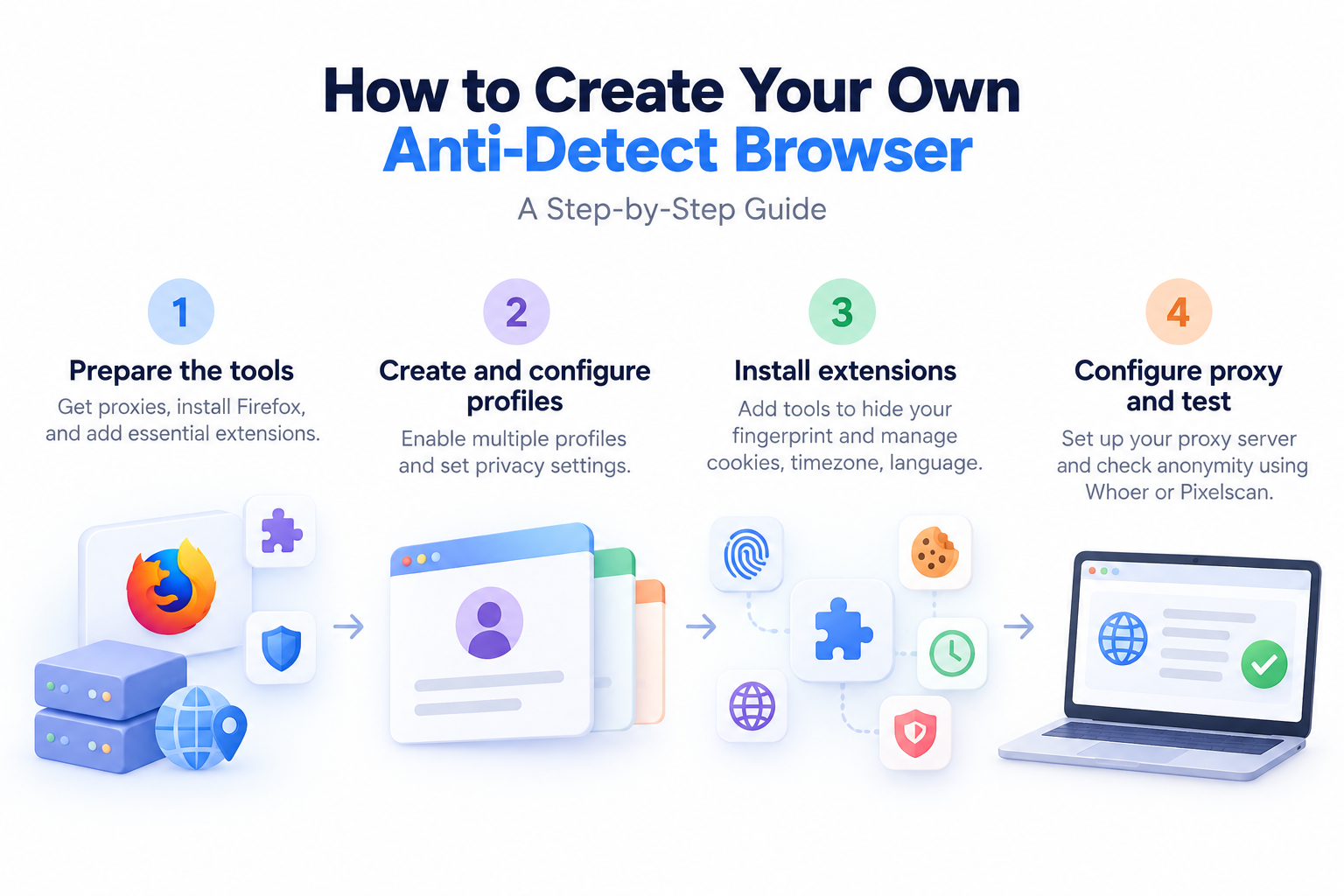
Proxies, Mozilla Firefox, and a few browser extensions are all you will need.
- Proxies: They account for 90% of your success, so choosing a reliable provider is crucial. First and foremost, the proxy location must match your target GEO; otherwise, all efforts are pointless. Regarding the protocol, SOCKS is the preferred choice due to higher anonymity, and for the type, residential or mobile proxies are ideal.
- LilProxy: A budget-friendly mobile proxy service with IPs from specific regions. It features an automatic rotation system, API access, and a user-friendly interface.
- Asocks: Provides residential proxies on a pay-as-you-go traffic model. It boasts a huge global IP pool, high anonymity, and stable connections with a simple setup and no subscription fees.
- Froxy: A mobile and residential proxy service with wide geographic coverage and flexible settings. It allows filtering by ASN, device type, operators, and countries, supporting IP rotation.
- Mozilla Firefox: We will explore how to set everything up using Firefox. It is considered less popular and familiar to most advertising platforms than Chrome, but this does not prevent it from working effectively. Moreover, Firefox has an advantage for multi-accounting: it consumes significantly less RAM and operates on open-source code.
- Extensions: These are the “crutches” that will help replace the interface functions of any commercial anti-detect browser. With them, you can configure your own fingerprint, set up proxies, and perform other necessary tasks.
Once the buyer gathers all the tools, it is time to configure the details. It is most convenient to do this on a computer.
How to create an anti-detect browser
In this section, we will look at how to build your own software and automate the workflow.
Choosing the browser
We chose Firefox not only because it saves computer resources. It also collects less telemetry data about users, making it inherently harder for advertising platforms to track the user.
Working with Google Chrome used to be aided by the Trace extension, which is currently unavailable. We could not find functionally equivalent alternatives that provide the same level of control.
Therefore, download the Firefox installation file from the official website and wait for the installation to complete.
Creating profiles
First, let us set up quick switching between accounts. To do this, type about:config in the search bar, accept the risk warning, search for browser.profiles.enabled, and change its status to True.
Restart Firefox and type about:newprofile in the search bar. Here, specify the name, color theme, and avatar for the new profile.
Now, we need to configure the browser to make it harder to track the user.
Scroll down the “General” tab and uncheck “Use recommended performance settings” and “Use hardware acceleration when available”.
If you leave these functions enabled, the website will detect the device’s graphics card and processor, making it much harder to hide the fingerprint.
Next, go to the “Privacy & Security” tab to enable strict protection. This will help prevent account intersections and block third-party trackers.
To create a new profile, simply follow the setup instructions above. First, set the privacy parameters for each account, and then install the extensions from the next section.
Installing extensions
Now you can install the tools to maintain anonymity. You will need:
- Privacy Possum: Prevents tracking by spoofing the analytical data collected by websites.
- WebRTC Leak Shield: Sends random WebGL values to the website’s server. Thanks to this, algorithms cannot establish the user’s true fingerprint.
- WebGL Fingerprint Defender: Provides additional protection against hardware WebGL exposure.
- Spoof Timezone: Changes the time zone to a user-defined or random one. This helps eliminate the de-anonymization factor based on time correlation.
- Language Switch: Hides the actual system language and sends server data indicating the use of the language specified by the affiliate marketer.
- uBlock Origin: Blocks website tracking algorithms and prevents servers from collecting real information about the user’s device.
- EditThisCookie2: A cookie manager that helps clean cookies in a timely manner and avoids suspicion from advertising platforms.
- FoxyProxy Standard: A proxy client. It will come in handy at the final stage of preparing the account for work.
You do not need to be an expert in these tools: simply download, install, and they will work. To verify if an extension is active, click the puzzle piece icon in the browser toolbar and check its status.
Configuring proxy servers
Open FoxyProxy Standard, select the “Proxies” option, and fill in the data: name, IP address, port, login, and password for connecting to the proxy.
Save everything, open FoxyProxy again, select the created template, and click on “Location”.
The built-in tool will show which country you are currently in and whether the proxy is functioning correctly.
How to check the performance of your anti-detect browser
To find out if you have configured all the program elements correctly, simply visit Whoer or Pixelscan. Both services will show the user’s location, the device they are using, and whether they are successfully masked via a proxy or anonymizer.
If you still want to buy a ready-made anti-detect browser at a discount, check out our selection of the best services in related articles.
Conclusion
In theory, such software can be built on any browser engine. All you need is a convenient environment for switching accounts, as well as the ability to install auxiliary tools to hide WebGL, time zone, language, fonts, and other parameters from websites. Firefox collects less information than Chrome, making it easier to create a secure work account with it.
Before every login to Facebook, Twitter, TikTok, or other advertising platform dashboards, you must additionally verify the anonymity status through a specialized service. If the system fails, the best-case scenario is a frozen account, and the worst is a permanent ban.
Best anti-detect browsers from our list:
- AdsPower: Suitable for managing multiple accounts on advertising platforms like Facebook. The anti-detect tool allows you to create and configure separate browser profiles with unique fingerprints.
- 0detect: The service offers an extended set of functions for managing multiple accounts while maintaining anonymity. Its key feature is digital fingerprint substitution, allowing you to change the User-Agent, device settings, and more.
- Dolphin{anty}: Real fingerprints, one-click profile creation, flexible settings, bypassing anti-fraud systems, and minimal bans. The service stands out with unique features like profile synchronization and automation.
- Linken Sphere 2: One of the first solutions in the CIS market for closing multi-accounting tasks. Sphere browser is the pioneer of what we now call anti-detect technology.